Project update 6 of 6
Dabao Boards Are En Route & New BIO Tools!
by Andrew 'bunnie' HI’m pleased to announce that the Dabao boards have shipped from the factory! They were picked up from the factory on June 26th, and are going through an arduous customs clearance and import process. Because of this, I am not able to make any promises on how long it will be until a board ends up on your doorstep.
There is a lot of friction and unpredictability getting stuff imported into the US these days, and this extra friction raises genuine questions about the long-term role of the US as a central hub for the distribution of physical goods. Americans are of course entitled to vote for the government they want; however, it is now established fact that a popularly elected government is not equivocal to a government that facilitates being a trade hub. As a consequence, I am starting to put out feelers for alternative solutions to better serve customers outside of the USA.
BIO Tooling Updates
If you’re thinking about playing with the BIO I/O co-processor on the Baochip-1x, I’ve prepared a suite of tools to help you on your journey.
bio-sim provides a C environment that compiles your code into assembly. It also provides a containerized simulation environment based on the actual chip RTL to aid with debugging. Waveform-based debugging of code is not new to hardware engineers, but it’s likely new to a software engineer. In this method, you are presented with a graphical representation of potentially every signal and intermediate state inside the BIO, and you can browse this interface to "time travel" back and forth through your code. I like to refer to this as "God mode" debugging, and it’s one of the coolest tricks that are enabled by open-RTL chips.
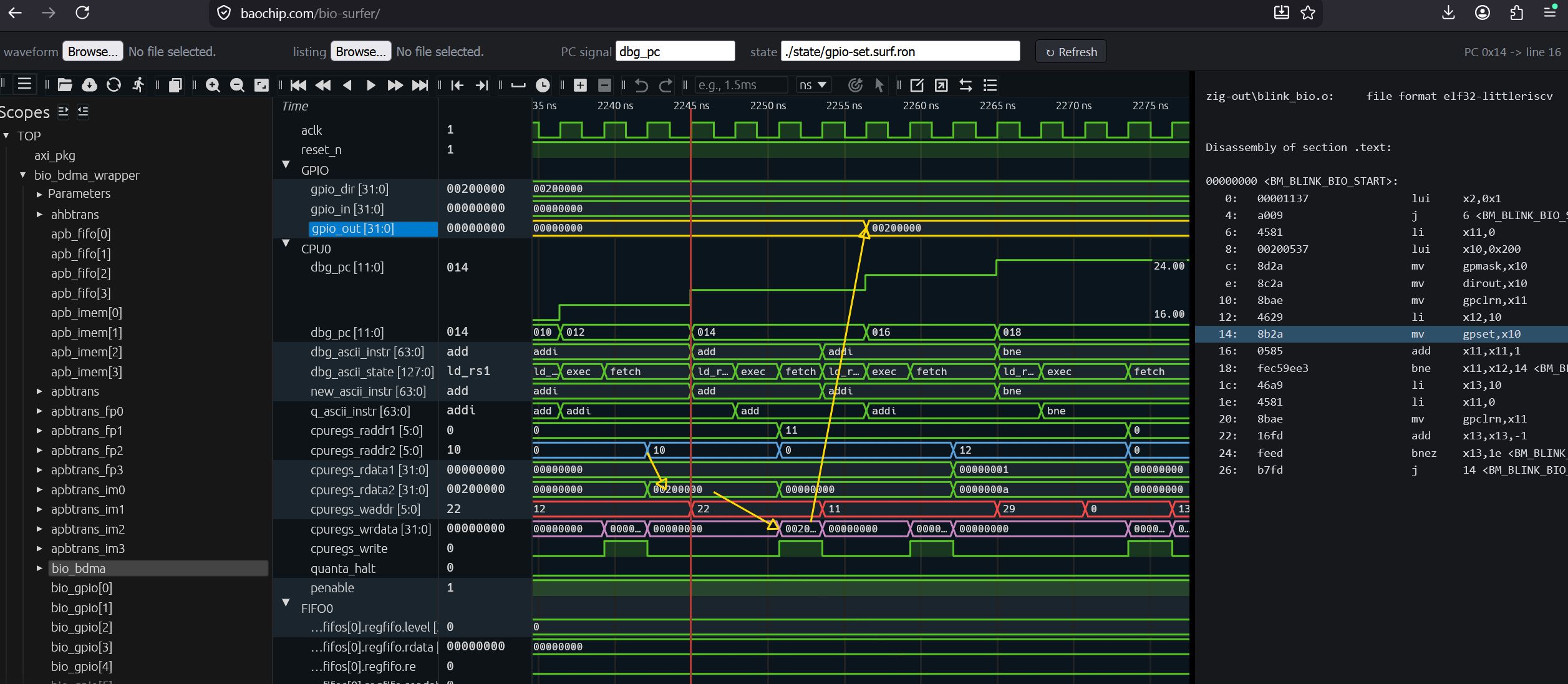
Above is an example of the waveform browser showing how values go from a line of assembly code to a change in the GPIO output tate. This waveform browser is a version "surfer" that has been modified to correlate a location in the waveform with a line of assembly code. You can check it out by clicking this link. Hint: right-clicking on a signal name brings up a menu, and selecting "expand scope" will take you to the part of the design with other interesting signals to look at.
I also created bio-loader. This is a tool that uses USB serial to upload BIO code into a BIO core. This makes the development loop a little bit tighter: you can upload your firmware directly to the BIO, instead of having to physically reset the board to get it into "firmware update" mode, and then push a button (or type boot) to get it into "run" mode.
With bio-loader, the Xous OS mediates the interaction between you and the BIO core. Of course, the convenience comes with a trade-off: the framework makes strong assumptions about which FIFO you’re using for debugging, for example, and you can only peek or poke a limited amount of data via the terminal. However, for entry-level tasks and simple programs this helps improve the "road feel" of the chip.
The tight integration of simulation & hardware validation into the command line paradigm should also facilitate those using agentic AI tools. For example, you can now ask your agent to run a simulation to confirm that the code works before you push it to hardware. Then, you can have it test the code directly on the hardware, as there are no longer physical buttons to push in order to close the testing loop.
Hopefully these tools will make playing with the BIO even more fun!
Happy hacking!
-b.