Project update 1 of 1
Big news, software updates, and hardware info
by Mehrdad MI wanted to share some updates regarding this project with those who have been patiently following us.
Soft (Software) Launch
We have been hard at work during the last couple of years to build a new type of computer that you can communicate with, through a unified interface.
In simple words, we want to let users go from expressing an intent to accomplishing that with just a few lines of code, or via an API, or even without writing any code, through natural language or a customizable GUI (graphical user interface).
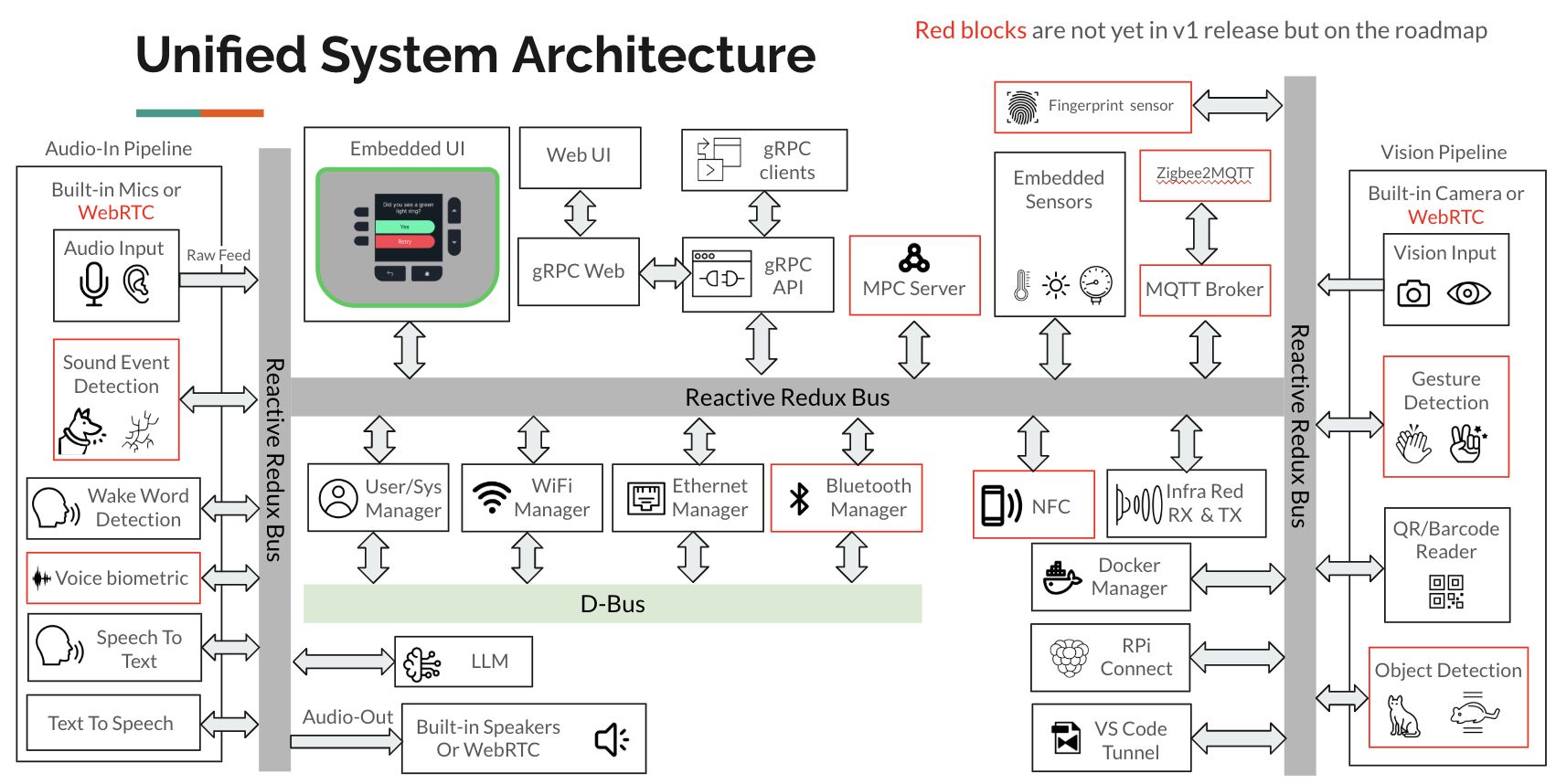
Here’s an block diagram of Ubo core software architecture:
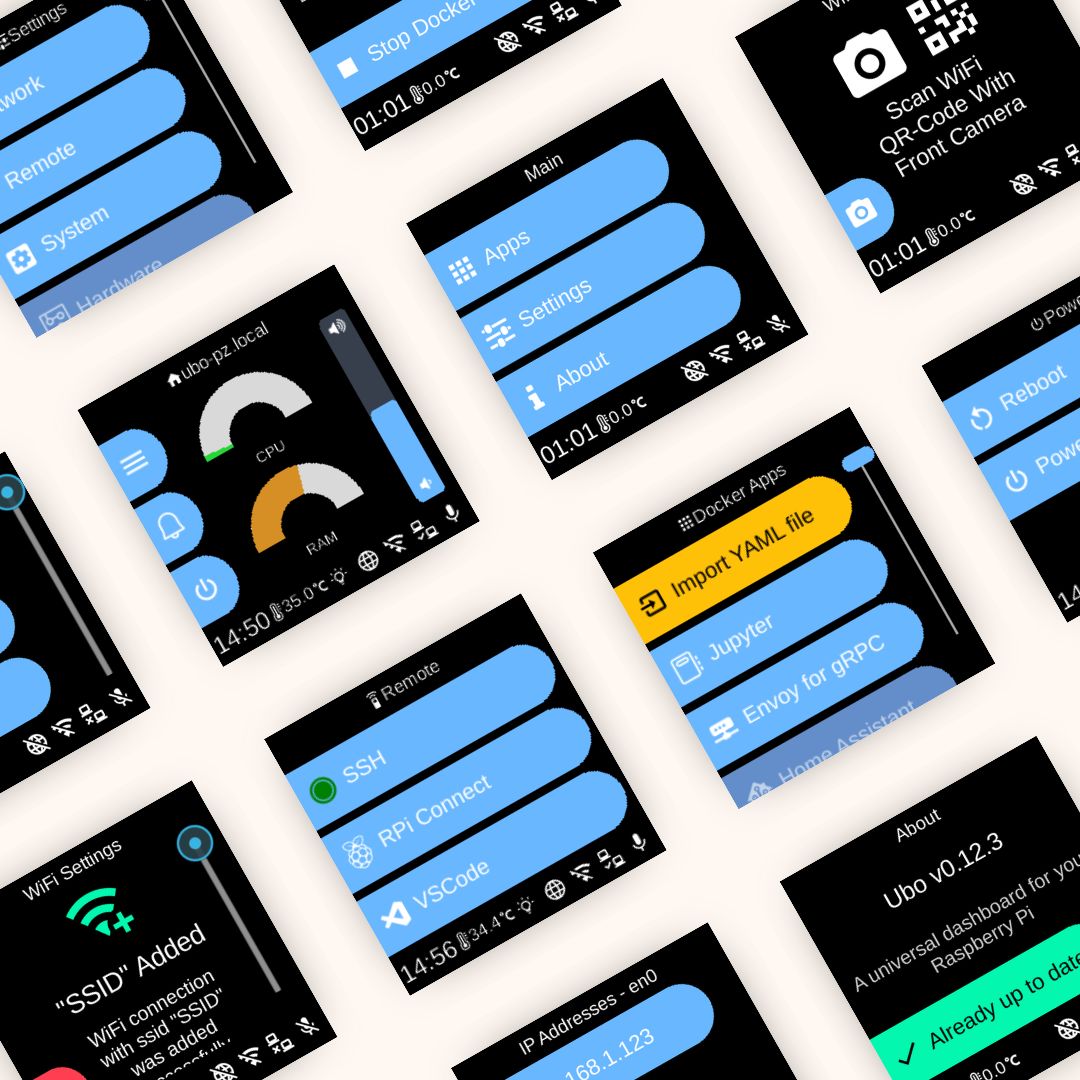
As of now, you can use the GUI to:
- Manage
SSHand remote connection - Monitor system resources (
CPU,Memory,Network,Disk) - Manage networking (add/delete
WiFi, getIPaddress, etc) - Manage users (add, delete, make sudoer, etc)
- Manage file system
- Setup remote connection via RPi Connect or VSCode Tunnel
- Install third-party applications
- Adjust hardware settings
- and a lot more
We don’t wish to make you wait longer to try this idea. So we went ahead and emulated the GUI in the browser. You can also receive audio/speech through the browser.
This quick demo shows how you can use the GUI in the browser to install a dockerized app (in this case, Jupyter Notebook) and access it through the browser.
There’s still some work remaining to feed your laptop/phone’s camera and microphone into your Pi via the browser.
You can download the full image and run it on Raspberry Pi 4 or 5 from our release page. To keep track of our progress, make sure you star/follow our GitHub repo for upcoming releases.
Here’s a step-by-step guide and video demo to run and use the app:
Of course, the emulation approach has its limitations since we cannot emulate specialized hardware such as sensors, radios, etc. To work with those elements, the hardware would be needed.
Language Agnostic API
One principle idea since the beginning of this project was to create an open and inclusive community of developers.
As part of this, we did not want to have a strong bias toward a given programming language and let anyone pick their language of choice.
So, we designed a language agnostic (grpc) API that you can call from any programming language. You can use this API to give any code a multi-modal UX.
For example, if your code throws an error, you can show it on LCD display and/or play an error chime. Or you can prompt users to enter input (text, QRcode, etc) via built-in GUI or Web UI.
Your code does not have to run on the local machine (Raspberry Pi) either.
You can check out some sample codes in different programming languages on our Github repository.
An Update on Hardware Release and Crowdfunding
We are still aiming to release the hardware. However, unfortunately, due to supply chain challenges created by newly imposed tariffs and logistics nuances, we have decided to take a more incremental and direct approach in releasing the hardware.
Therefore, we are re-evaluating when and what hardware to crowdfund on Crowd Supply.
Hopefully in the near future, we will introduce an exclusive and specialized product model for the Crowd Supply community.
If you have any feedback for us on specific hardware features/capabilities or any general questions, feel free to join our discord community or contact me via my personal email address: mehrdad@getubo.com.
Thank you,
Mehrdad
Archival purposes only.
This project has been abandoned and will not launch.