Project update 2 of 13
Easier Design Flow: LibreLane & the gf180mcu Project Template
by Tim 'mithro' AnsellHey everyone,
If you’ve been following open silicon over the past few years, you know the story: Google’s open PDK program changed everything, but when Efabless shut down earlier this year, a lot of infrastructure disappeared. That’s part of why wafer.space exists - to rebuild accessible fabrication services.
But fabrication is only half the equation. You also need tools to actually design your chip. That’s where LibreLane comes in.
Last month at ORConf 2025 in Valencia, Mohamed Gaber and Leo Moser presented LibreLane - the next-generation design flow for open silicon. And there’s now a ready-to-use gf180mcu project template that makes starting your wafer.space design even easier.
What is LibreLane?
LibreLane is a ground-up rewrite of OpenLane - the tool that made hundreds of open-source tapeouts possible through Google’s MPW shuttles and Efabless programs. Originally developed as "OpenLane 2" at Efabless, it’s now community-driven under the FOSSi Foundation after being officially released in July 2025.
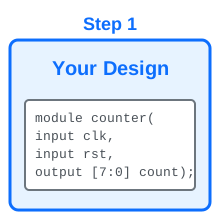
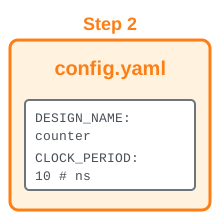
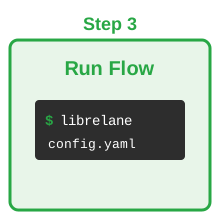
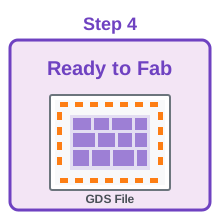
If you used OpenLane 1, you know it works: you give it a Verilog file and a config, run one command, and get GDS ready for fabrication. LibreLane keeps that simplicity while fixing the pain points.
Why the Rewrite?
OpenLane 1 was built under tight deadlines to enable the first Google MPW shuttles. It worked amazingly well for that goal, but had some limitations:
- Written in Tcl, which made debugging and extending difficult
- Hard to run individual steps or insert custom tools
- No standard way to report design metrics
- Difficult to integrate with other workflows
LibreLane addresses all of this while maintaining backwards compatibility - your existing OpenLane 1 configs work with LibreLane.
What Makes LibreLane Better?
🐍 Python-Based Infrastructure: Modern Python instead of Tcl means better tooling, clearer code, and a real API if you need programmatic control. No more fighting with "stringly-typed" scripts.
🔧 Modular Architecture: Run individual steps (synthesis, placement, routing) independently. Insert custom tools into the flow. Debug specific stages without rerunning everything. The flow is a pipeline you can actually customize.
📊 Clear Error Reporting: Standardized metrics and status reporting at every step. When something fails, you know exactly where and why.
🎯 Automated Padframe Generation: LibreLane handles IO pad insertion and configuration automatically. This is huge - pad ring creation used to be one of the most error-prone manual steps. Now it just works.
🌍 Multi-PDK Support: The same design can target different process design kits. gf180mcu is fully supported on the main branch, as is sky130, while ihp-sg13g2 is supported in the dev branch. Write once, fabricate anywhere.
↔ Backwards Compatible: Existing OpenLane 1 configurations work with LibreLane. Easy migration path if you’ve used OpenLane before.
Real-World Adoption
LibreLane isn’t experimental - it’s already in production use:
- Tiny Tapeout has adopted LibreLane for their automated tapeout service
- ChipFoundry is using it for their fab pooling platform
- wafer.space uses it for their gf180mcu project template
The shift from OpenLane 1 to LibreLane mirrors what happened in the fabrication world: when Efabless shut down, the community rebuilt better infrastructure. wafer.space rebuilt affordable fabrication access. LibreLane rebuilt the design flow. Both are about making open silicon sustainable.
The gf180mcu Project Template
To make getting started even easier, there’s now a project template specifically configured for wafer.space designs targetting the gf180mcuD PDK variant.
This template gives you a working starting point with everything included:
- LibreLane configuration pre-configured for gf180mcuD and wafer.space requirements
- Nix-based development environment -
nix-shelland you're ready to go, no manual tool installation - cocotb testbench framework - Python-based verification for your design
- Complete workflow - from RTL to GDS, including LVS, DRC and gate-level simulation
- Example counter design - shows the whole flow working
Getting Started
# Clone the template
git clone https://github.com/wafer-space/gf180mcu-project-template
cd gf180mcu-project-template

# Set up environment (installs everything automatically)
nix-shell

# Add your design to src/
# Update librelane/config.yaml with your design parameters

# Run the flow
make librelane

# View the results
# Opens in OpenROAD GUI or KLayout
make librelane-openroad
make librelane-klayout
That’s it. Five steps from empty directory to GDS output.
Everything is set up to work together. You focus on your design, the template handles the infrastructure.
Watch the ORConf Talk
Want to see LibreLane in action? The full ORConf 2025 presentation by Mohamed Gaber and Leo Moser is on YouTube:
The talk covers:
- Technical architecture and design decisions
- Live demos of the flow
- Advanced use cases and customization
- Future development roadmap
- Q&A with the community
It’s worth watching if you want to understand the full capabilities beyond just running make librelane.
Important Notes
This is a work in progress. LibreLane and the template are actively developed and improving. If you use them:
- Stay up to date with the latest changes
- Report issues you encounter
- Contribute improvements if you can
- Join the community chat for help
The template is an example to help you get started, not a mandatory requirement. You can use LibreLane directly, adapt the template to your needs, or build your own workflow entirely. It’s there to make your life easier, not to constrain how you work.
Community support is available through the FOSSi Foundation chat and the wafer.space Discord / Matrix channels. LibreLane has active developers and users who can help.
Resources
LibreLane:
- Documentation: librelane.rtfd.io
- Announcement: FOSSi Foundation Blog
- ORConf Talk: YouTube
gf180mcu Project Template:
- Repository: github.com/wafer-space/gf180mcu-project-template
- README with detailed instructions
- Example designs showing best practices
Community:
- FOSSi Foundation: fossi-chat.org
- wafer.space Discord: discord.gg/43y2t53jpE
- wafer.space Matrix: #gf180mcu:fossi-chat.org
Why This Matters
Open silicon has come a long way in just a few years. We went from "you need millions of dollars and proprietary tools" to "here’s an affordable MPW run and free, open-source tools."
But accessible doesn’t mean easy. Chip design is inherently complex. Projects like LibreLane and templates like this one are about removing the incidental complexity - the tool installation headaches, the configuration mysteries, the "why doesn’t this work" debugging sessions.
Your time should go into designing your chip, not fighting your tools.
LibreLane handles the flow. The template handles the setup. You handle the innovation.
Whether you’re targeting the December 3rd deadline or planning for a future run, these tools are here to help you go from idea to silicon faster and with less friction.
- Tim 'mithro' Ansell