Hello everyone,
First of all, I’d like to thank everyone who has shown interest in Fusion Chime Vision and asked questions so far — your curiosity and feedback really motivated me to share more details.
In this update, I want to walk through a bit of the backstory of how Fusion Chime Vision came to life.
The idea started very simply: our old-style electromagnetic buzzing chime was too loud and often disturbed my daughter. She used to joke with me, saying “Dad, you’re an engineer, and yet look at the doorbell we have at home… Can’t you put something nicer here?”
At first, I just wanted to give new life to some ESP32 boards sitting in my drawer by building a simple smart chime, but I quickly realized that if I replaced the existing chime with an ESP32-based one, the system wouldn’t work anymore (because the ESP32 needs continuous power, unlike old-fashioned chimes). That’s when I decided the doorbell button itself also needed to become smart.
From there, things evolved. As I worked more on the project, I thought it might actually make sense to bring it to Crowd Supply — and that’s how this adventure began. Later, when people online started asking whether it had video or audio intercom features, I decided to add a display too. Of course, that made everything much harder, since I was now pushing the ESP32 close to its hardware limits. Achieving acceptable video and audio quality was not possible with any off-the-shelf libraries I could find.
Nighttime Visibility
The common OV2640 camera performed very poorly at night, and the ESP32-CAM didn’t support the OV5640 out of the box. Audio streaming was also unreliable. After a lot of trial and error, I discovered that some OV5640 modules could work with the ESP32-CAM without overheating, and by writing my own upper-layer code with simple compression + UDP packet repetition, I finally managed to get reliable audio streaming as long as Wi-Fi signal strength was good (above -75 dBm). Developing similar methods for video transmission took even longer. There were no efficient examples available online, so I had to solve each problem one by one.
Some of you asked me about low-light performance, so I’ve included a test image below. In this picture, the street still has some dim light from a lamp. When it’s completely dark outside, the results are of course much darker.
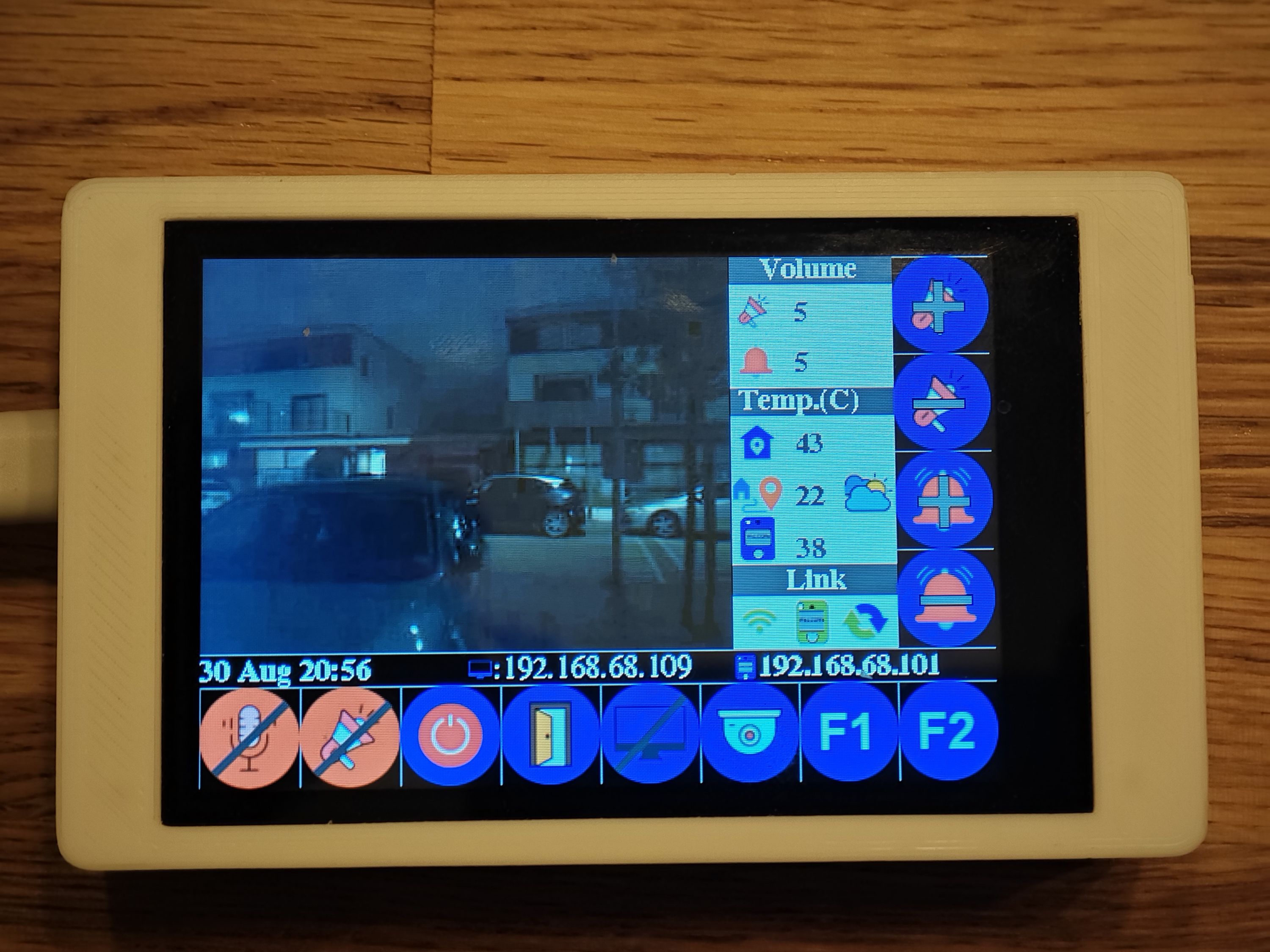
A few of our visitors have commented (hopefully not just to flatter me 😅) that the blue button LED and the glowing display look cool and "futuristic" from a distance. Below is a short nighttime video showing the doorbell’s appearance. In it, you can compare the light captured by my phone’s camera to the image above, which shows how the scene looks on the doorbell’s display. It gives a nice perspective on how well the doorbell camera handles low-light conditions. (To clarify, the screen can be configured to remain off until motion is detected, and the displayed content is highly configurable. System information like IP addresses and the storage-availability indicator can be removed from the external display as well.)
Thank you for following along — more updates, demos, and behind-the-scenes photos coming soon! Feel free to reach out any time if you have questions.