Project update 8 of 9
Introducing Diabolic Shell, A Covert Encrypted Bidirectional Channel for Command Execution & Data Exfiltration
by Omar YoussefGreetings, fellow operators!
The game has just changed…
Today, I’m thrilled to unveil the crown jewel of Firmware v2.0: a feature that fundamentally changes what’s possible with your Diabolic Parasite. This update is packed with enhancements, optimizations, and bug fixes, but sitting at the top is something truly special, something that’s going to make your red team engagements feel like you’re cheating.
This isn’t an incremental improvement. This is a paradigm shift. And right now, no other tool on the market has this capability:
Diabolic Shell:
A covert encrypted bidirectional HID channel. Hidden shell access. Real-time command execution. Silent data exfiltration. All through a hardware-layer protocol that blends seamlessly with normal USB peripheral traffic.
Welcome to the next level. Let’s rewrite the rules.
First, Let’s Kill a Misconception
I’ve heard the chatter: "But it’s visible if I plug it into my laptop!" Let me address this directly: why would you plug it into your laptop? You are not the target!
Your Diabolic Parasite was engineered for corporate penetration testing, it wasn’t designed to dangle off someone’s MacBook in a coffee shop. It was engineered to disappear into the chaos behind corporate workstations and tower cases. Disable the RGB and it vanishes among the tangle of peripherals. Once that machine is set up, nobody audits what’s lurking in the back. Nobody questions what was there when they arrived.
That’s where your Parasite lives. Invisible.
And remember, you have the Diabolic Drive for social engineering scenarios. Hundreds of pretexts, all ending with your target plugging it in themselves.
Right tool. Right scenario. Maximum impact.
Diabolic Shell: The Capability
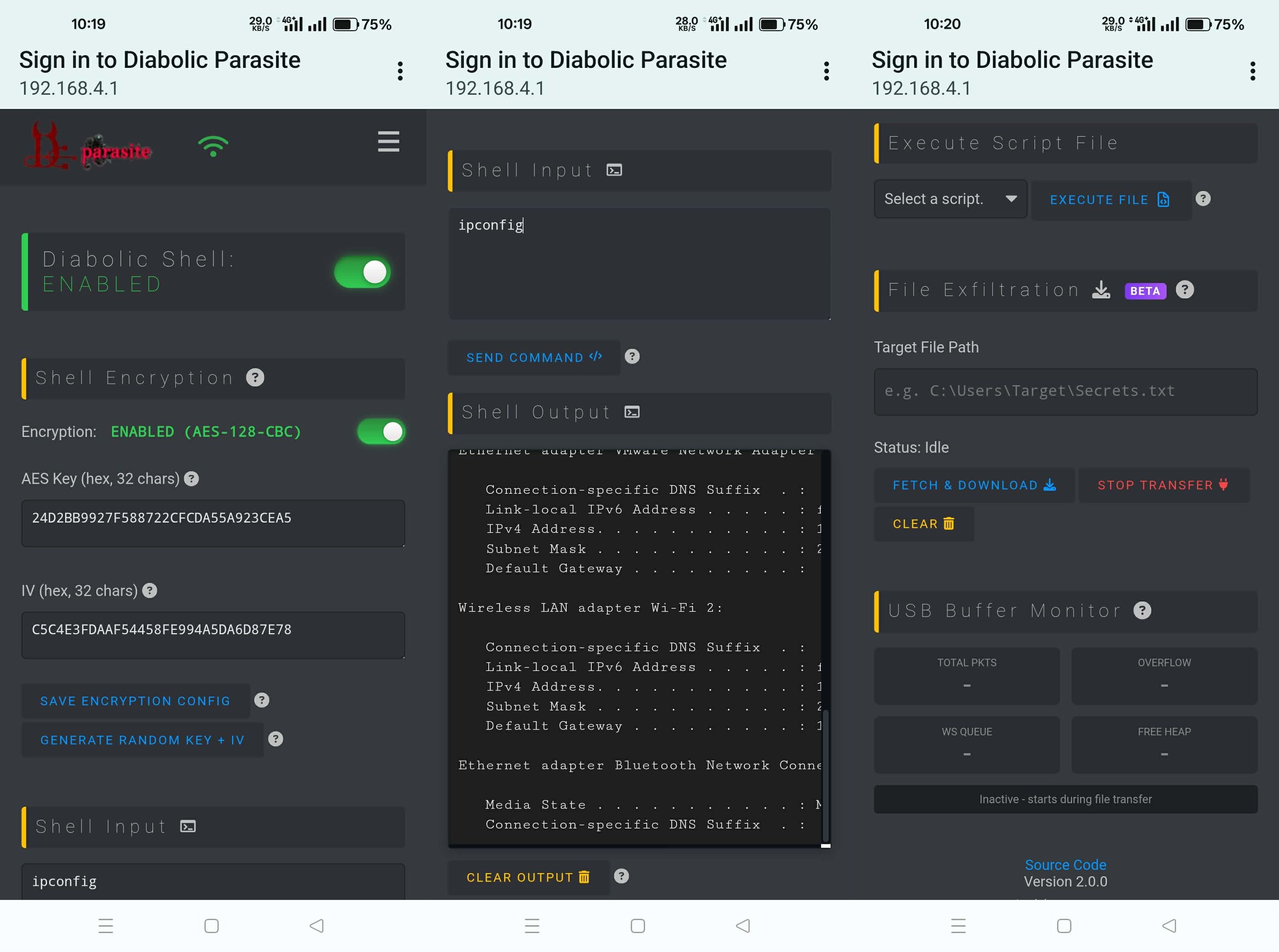
Diabolic Shell gives you an encrypted tunnel running over USB HID, a hidden shell spawned on the target. Commands in, output back, all streamed live to your Web UI as if you’re sitting at the target’s desk.
Oh, and file exfiltration… That’s through the same channel, through the same invisible protocol. All purpose-built for stealth operations and security research.
What it Enables
- Hidden shell access on the target system
- Real-time command execution with instant output streamed directly to your Web UI
- Covert file exfiltration over the same hardware-based HID channel, no network, no traces
Built Against the Limits
That’s what I always love: going beyond the limits!
320KB of SRAM, that’s what the ESP32-S3 gives us. Before firmware even loads. Before buffers. Before anything. Available memory is a fraction of that.
So I optimized, over many iterations, with low-level tricks and memory wizardry.
Through clever engineering, I’ve pushed far beyond these hardware constraints. In ideal testing conditions, I successfully exfiltrated a 9MB file in minutes. Any file type. No restrictions. All through a chip that shouldn’t be able to hold a fraction of that.
In real-world engagements, you’re pulling configs, credentials, text dumps, kilobytes. But knowing the ceiling is miles above you? That’s power.
How It Works
Diabolic Shell uses a four-line listener script, completely benign-looking and deployed via the Parasite’s keystroke injection capability with random cadence enabled for a human typing appearance.
That’s your art. From the basic command in the Run dialog that downloads the listener and executes—done, the target is compromised before they blink, even in air-gapped or hardened systems where there’s no network connection. The Parasite types the entire script directly into a hidden PowerShell window. The listener materializes out of thin air. No download. No network.
The vector you choose depends on your recon. What’s locked down? What’s monitored? What’s possible?
That’s your call. The Diabolic Parasite is the weapon, how you wield it is your craft. Here is the canvas, how you paint it is up to your skill as a red teamer.
For those who want to craft their own sophisticated listeners, full implementation details and customization guidance are available in our GitHub repo).
Once active, you can type commands directly into your Parasite’s Web UI and watch the output flow back in real-time, exactly like sitting at a PowerShell prompt on the target machine. Except you’re not. You’re across the room. Or across the building. Over an encrypted channel.
Ghost Protocol: EDR Evasion
Here’s where it gets beautiful.
Exfiltrated data travels through a hardware-based USB HID channel, the same type of channel gaming mice use for DPI settings, RGB peripherals use for lighting control, and devices use for firmware updates. It’s completely normal USB traffic that exists on virtually every modern peripheral connected to any workstation.
- No network traffic. Network monitoring sees nothing.
- No suspicious processes. Behavioral analysis finds nothing.
- No file system anomalies. Endpoint protection triggers nothing.
EDR solutions don’t inspect this layer because doing so would flag every gaming mouse and RGB device on the planet. The signal-to-noise ratio makes it impossible. Your data moves through a layer most security tools don’t even watch.
Your red team engagements just leveled up.
File Exfiltration Architecture
Large file transfers use WebSocket connections with browser caching: data arrives in chunks and is written directly to your browser’s cache for decoding. The tradeoff is you’ll need solid WiFi signal strength for large file downloads.
Solution? Enable Station Mode in your Parasite settings and use a range extender. That gives you a guaranteed stable connection and minimal WebSocket queue buildup during exfiltration. Problem solved. See it in action here!
I highly encourage you all to subscribe to the UNIT 72784 channel, as a wave of content is coming: deep dives into every feature, operational tactics, and guidance on how to get the maximum value from your Parasite.
Documentation & Resources
Full technical documentation for Diabolic Shell is available in our GitHub repo, along with the complete Firmware v2.0 changelog in the Releases section.
Thank you for believing in the Diabolic Parasite.
Stay sharp. Stay covert. Stay tuned and always remember: "The best backdoor is the one that looks like it belongs there."