Hello HealthyPi 6 backers!
There’s an often-asked question in embedded systems: "But can it run DOOM?" Today, we’re proud to answer: Yes, HealthyPi 6 runs DOOM, the original 1993 id Software classic, in full playable form, directly on the device, while simultaneously sampling and displaying ECG waveforms.
A real-time ECG trace overlays the bottom of the screen as you play, a 320-pixel wide green waveform on a black background with subtle grid lines. Because what’s a biosignal research device without vital signs, even while demon-slaying?
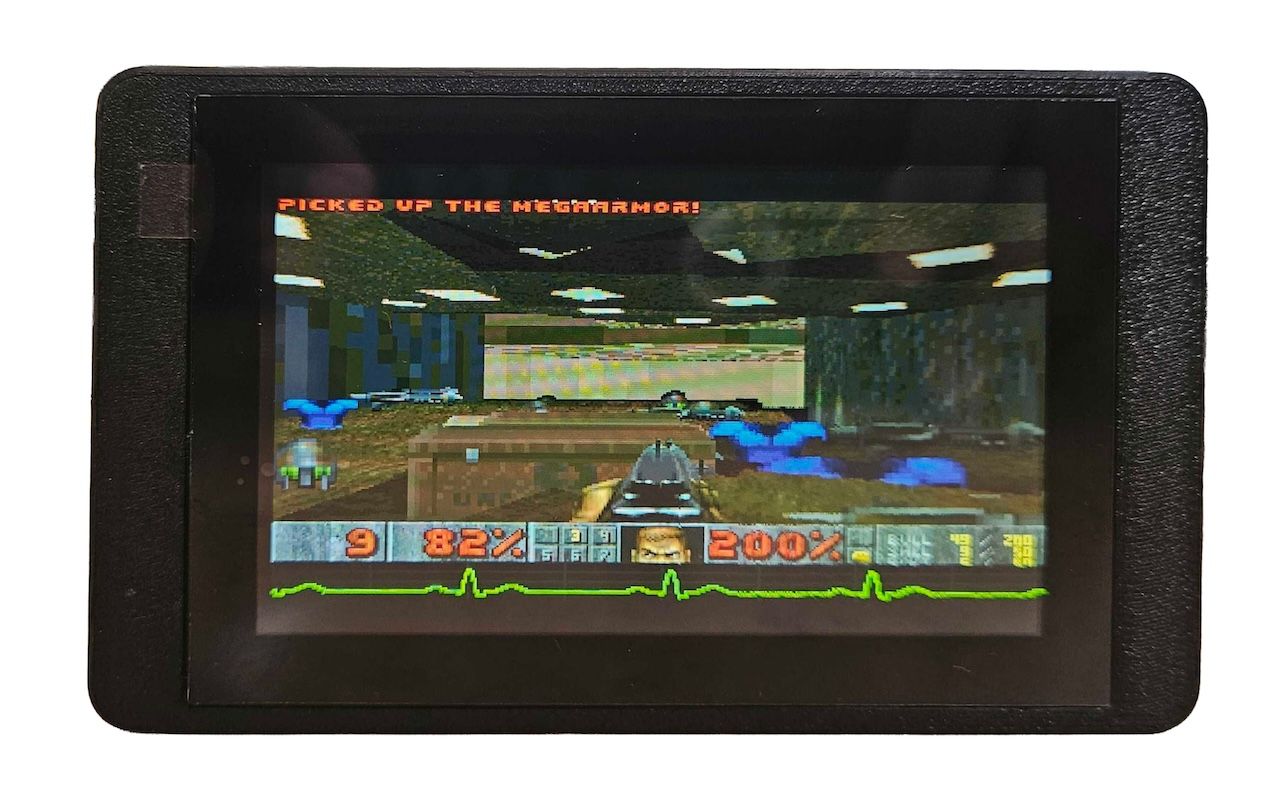
The idea came from NXP’s presentation at Open Source Summit Europe 2025, where they demonstrated DOOM running on Zephyr RTOS as a hardware validation technique. We thought: why just run DOOM when we could run DOOM while doing what HealthyPi 6 actually does, sampling biosignals? So we added the ECG waveform overlay.
Is this useful? Not really. But it’s more than a novelty, it’s a hardware validation demo that proves HealthyPi 6 can handle demanding graphics and real-time waveform visualization simultaneously. The same capabilities that run DOOM at 35 fps while rendering an ECG trace are what power your biosignal acquisition, LVGL interfaces, and edge ML inference.
Why DOOM Matters for a Research Platform
DOOM isn’t a benchmark we chose arbitrarily. It’s actually a demanding test of exactly the hardware subsystems that make HealthyPi 6 a powerful biosignal research platform:
| DOOM Requirement | HealthyPi 6 Capability | Research Application |
|---|---|---|
| 6 MB zone heap | 32 MB on-board SDRAM | TFLite inference arena, long-term recording buffers |
| 35 fps rendering | Cortex-M7 @ 400 MHz | Real-time waveform display, LVGL UI |
| 320x200 → 800x400 scaling | DSI display pipeline | High-resolution ECG/PPG/EEG visualization |
| Touch input | GT911 capacitive touch | Interactive data exploration UI |
| File I/O from storage | SD card + FATFS | Multi-day recording, ML model loading |
| Real-time game loop | Zephyr RTOS threading | Concurrent multi-channel acquisition |
| ECG waveform overlay | Full-width vitals bar | Real-time biosignal visualization |
If HealthyPi 6 can run a real-time 3D game while simultaneously sampling and rendering ECG data, it can certainly handle bio-signal acquisition and edge ML inference.
The Technical Challenge
Running DOOM on an embedded microcontroller isn’t trivial, but it’s been done many times and is well-documented thanks to doomgeneric and other similar ports. Doomgeneric is a portable DOOM implementation designed specifically for embedded systems. What makes doomgeneric ideal for microcontroller ports is:
- Minimal platform interface: Only six functions to implement (
DG_Init,DG_DrawFrame,DG_SleepMs,DG_GetTicksMs,DG_GetKey,DG_SetWindowTitle) - Self-contained rendering: Outputs to a simple ARGB8888 framebuffer—no GPU dependencies
- Original DOOM engine: Uses the actual id Software source code (GPL-2.0), not a reimplementation
- No external dependencies: No SDL, no OpenGL, just pure C that compiles anywhere
We implemented the platform layer in doom_zephyr.c, connecting doomgeneric’s callbacks to Zephyr’s display, input, and timing APIs. Here’s what we had to solve for HealthyPi 6:
Memory: 6 MB Zone Heap in SDRAM
DOOM uses its own memory allocator called the "zone memory system"—a custom heap that manages game assets, level geometry, sprites, and more. The original PC version needed 4-8 MB of RAM, which was a lot in 1993.
HealthyPi 6’s 32 MB SDRAM easily accommodates this:
SDRAM1 Memory Layout for DOOM:
0xC0000000 - 0xC011FFFF: Display framebuffers (1.1 MB)
0xC0200000 - 0xC07FFFFF: DOOM zone heap (6 MB)
0xC0800000 - 0xC083FFFF: DOOM video buffer (256 KB)
0xC0840000 - 0xC09BFFFF: Scaling framebuffers (1.5 MB)
In HealthyPi 6: This same SDRAM hosts the 1 MB TFLite tensor arena for beat classification, 512 KB model cache, and multi-channel recording buffers.
Display: Landscape Rotation with Real-Time Scaling
DOOM renders at 320x200 pixels in ARGB8888 format. HealthyPi 6’s display is 480x800 portrait. So, we needed to:
- Scale 320x200 to 800x400 (2.5x horizontal, 2x vertical)
- Rotate 90° counter-clockwise for landscape orientation
- Center on the display with 40px black borders
- Convert ARGB8888 to RGB565 for the display controller
- Maintain 35 fps with double-buffering
/* Combined scaling + rotation in one pass */
for (int out_y = 0; out_y < 400; out_y++) {
    int src_y = out_y / 2;  /* 2x vertical scale */
    for (int out_x = 0; out_x < 800; out_x++) {
        int src_x = (out_x * 2) / 5;  /* 2.5x horizontal scale */
        /* Rotate and write to physical framebuffer */
    }
}
In HealthyPi 6: This same display pipeline renders real-time ECG waveforms at 500 Hz, multi-channel EEG traces, and AI classification results. DOOM proves there’s headroom for smooth visualization even during demanding workloads.
Input: Touch Zones for Game Control
Without a keyboard, we mapped the touchscreen to game controls using zones:
Touch Layout (800x480 logical landscape):
+------------------------------------------------------------------+
|  TOP BORDER (menu navigation)                               y=0-40|
+------------------------------------------------------------------+
|                      FORWARD                              y=40-190|
+------------------------------+-----------------------------------+
|         LEFT                 |            RIGHT           y=190-350|
+------------------------------+-----------------------------------+
|         USE                  |            FIRE           y=350-440|
+------------------------------------------------------------------+
|  BOTTOM BORDER (menu)                                   y=440-480|
+------------------------------------------------------------------+
In HealthyPi 6: The GT911 touch controller handles the LVGL-based UI for navigating waveforms, adjusting acquisition parameters, and reviewing recorded data.
Storage: WAD Files from SD Card
DOOM’s game data (levels, textures, sprites) comes from WAD files. We load DOOM1.WAD (4.2 MB) directly from the SD card using Zephyr’s FATFS integration:
#define DOOM_WADDIR "/SD:/doom"
/* DOOM reads directly from SD card */
doomgeneric_Create(doom_argc, doom_argv);
In HealthyPi 6: The same filesystem infrastructure enables 23-day continuous recording to SD card, TFLite model loading, and configuration storage.
What This Proves for Your Research
1. The Cortex-M7 @ 400 MHz Has Real Performance Headroom
DOOM’s game loop runs alongside ECG sampling and waveform rendering without frame drops. In the actual HealthyPi 6 application, the M7 handles sensor acquisition while the M4 core runs signal processing algorithms (Pan-Tompkins QRS detection, HRV analysis, SpO2 calculation). DOOM proves the M7 has headroom to spare even when doing demanding graphics work.
2. 32 MB SDRAM Is Production-Ready
DOOM exercises the entire SDRAM with random access patterns during gameplay—texture lookups, sprite rendering, level traversal. No crashes, no corruption. This memory has been validated under demanding real-time workloads.
3. Zephyr RTOS Threading Works
DOOM runs in its own thread while ECG sampling runs in another, both responsive and concurrent:
k_thread_create(&doom_thread_data,
    doom_thread_stack,
    32 * 1024,           /* 32 KB stack */
    doom_thread_entry,
    NULL, NULL, NULL,
    5,                    /* Priority 5 */
    0, K_NO_WAIT);
This is the same threading model that runs sensor acquisition, IPC communication, and display updates concurrently in the actual firmware.
4. The Display Pipeline Is Smooth
Double-buffered rendering with real-time scaling proves the DSI display controller can handle demanding graphics workloads.
The Build: One App, Same Hardware
DOOM runs as a standalone Zephyr application on the exact same hardware as the biosignal acquisition firmware—no modifications needed:
# Build DOOM (uses same board definition)
west build -p auto -b healthypi6_v2/stm32h757xx/m7 \
    -d build_doom app_doom \
    -DEXTRA_DTC_OVERLAY_FILE='doom-display.overlay'
The only difference is the software. This demonstrates that HealthyPi 6’s hardware platform is versatile and well-designed—capable of running demanding applications beyond bio-signal acquisition, opening possibilities for custom research tools and interactive experiments.
Open Source, Of Course
The DOOM port is fully open source and included in the HealthyPi 6 repository:
app_doom/
├── src/
│   ├── main.c              # Zephyr entry point
│   ├── doom_video.c        # Display scaling/rotation
│   ├── doom_input.c        # Touch-to-key mapping
│   ├── doom_filesystem.c   # SD card integration
│   ├── vitals_bar.c        # ECG waveform overlay
│   ├── doom_ecg.c          # ECG sampling module
│   └── doom_config.h       # Memory layout
├── doomgeneric/            # doomgeneric source (GPL-2.0)
├── doom_memory.ld          # SDRAM linker script
└── prj.conf                # Zephyr configuration
Caveats
To be clear: this is a hardware validation demo, not a polished gaming experience. The port has some rough edges:
- Occasional crashes: The game may crash during extended play sessions
- Performance not fully optimized: Frame rate can drop in complex scenes
- ECG waveform is simulated: Currently displays a demo waveform rather than live sensor data
We don’t intend to invest further development effort here; DOOM has served its purpose as a stress test. Our engineering focus remains on the bio-signal acquisition, edge ML, and research capabilities that HealthyPi 6 was designed for.
Meanwhile, our HealthyLink expansion modules are progressing in the background, we’ll have an update on those shortly.