Project update 2 of 7
What if Prunt Doesn't Support a Feature You Need at Launch?
by Liam PowellPrunt is new, and while we are building it to support the workflows we think matter most, there may be a feature, plugin, or printer setup that Prunt does not support on day one.
This is why we have worked to make it easy to run Klipper/Kalico on Prunt Board 3. With the features we have added, it is even easier to run Klipper/Kalico on our board compared to any other standalone board on the market.
Let’s start with how you can switch from Prunt to Klipper/Kalico. Every Prunt Board 3 has a small header next to the main MCU. Simply install one of the included jumpers in the position shown below and next time you power up your board it will be running Klipper firmware instead of Prunt. No need to tinker with build settings or flash the board, just one jumper and you can switch firmware. Removing the jumper switches back to Prunt, again without any extra steps.
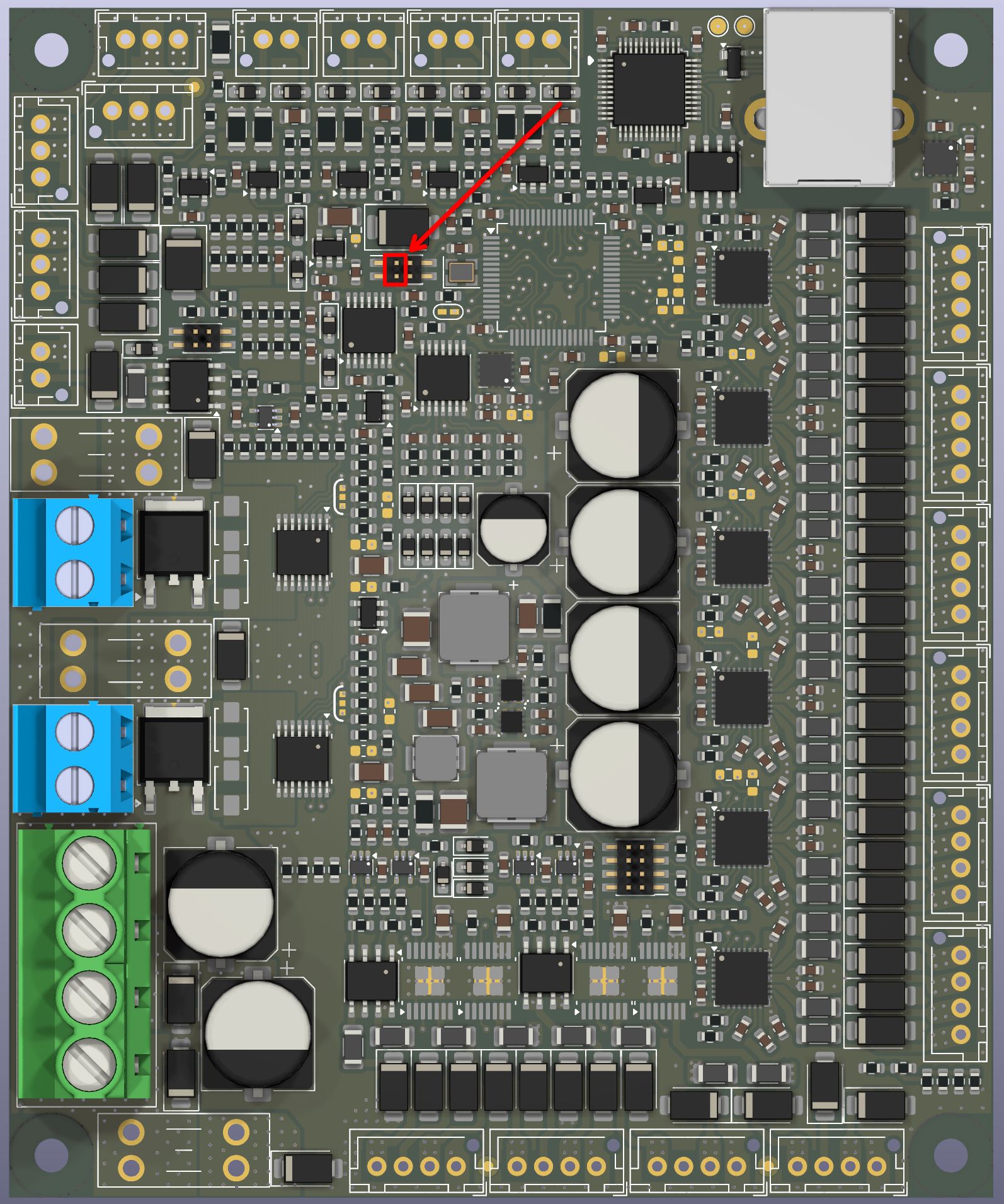
Now let’s talk about what makes our board easier to use with Klipper as compared with other boards. If you’ve ever set up a printer with Klipper before, you’ll know that the configuration looks something like this:
[stepper_x]
step_pin: PA14
dir_pin: !PA10
endstop_pin: PC4

[heater_bed]
heater_pin: PB2
sensor_pin: PA3

etc.
To find all those pin numbers, you have to go look at the schematic for the board and it’s easy to make mistakes when trying to trace out and transcribe so many pins. With the Prunt Board 3 your config instead looks like this:
[stepper_x]
step_pin: GPIO_STEPPER_STEP_3
dir_pin: GPIO_STEPPER_DIR_3
endstop_pin: GPIO_ENDSTOP_1

[heater_bed]
heater_pin: GPIO_HEATER_PWM_1
sensor_pin: GPIO_THERMISTOR_4

etc.
This is, of course, much easier than a regular Klipper board as you can simply look at the board to see where you have connected each component. This feature works without any changes to Klipper, so you’re not stuck on a specific version vendored by us. It’s actually possible for any Klipper board to do this, but no one has bothered aside from us.
When it comes to updating your board, you can remove the Klipper jumper, run the latest version of Prunt, and the board will auto-update its firmware, including the Klipper/Kalico portion. Our updates also use an A/B failsafe mechanism, so even if power is lost during the update process you will still have a fully functional board which you can just update again. As far as we are aware, there are no Klipper boards with this functionality.
Finally, we’ve also made some tweaks to the ADC code within Klipper so that our thermistor readings have an order of magnitude less noise than they would on any other board, but we’ll go into more details about that in another update where we benchmark our board against some other popular boards.
If you haven’t already, please support our project.