Project update 7 of 10
Mind-to-Words (M2W) with Single Channel EEG Input
by Upside Down Labs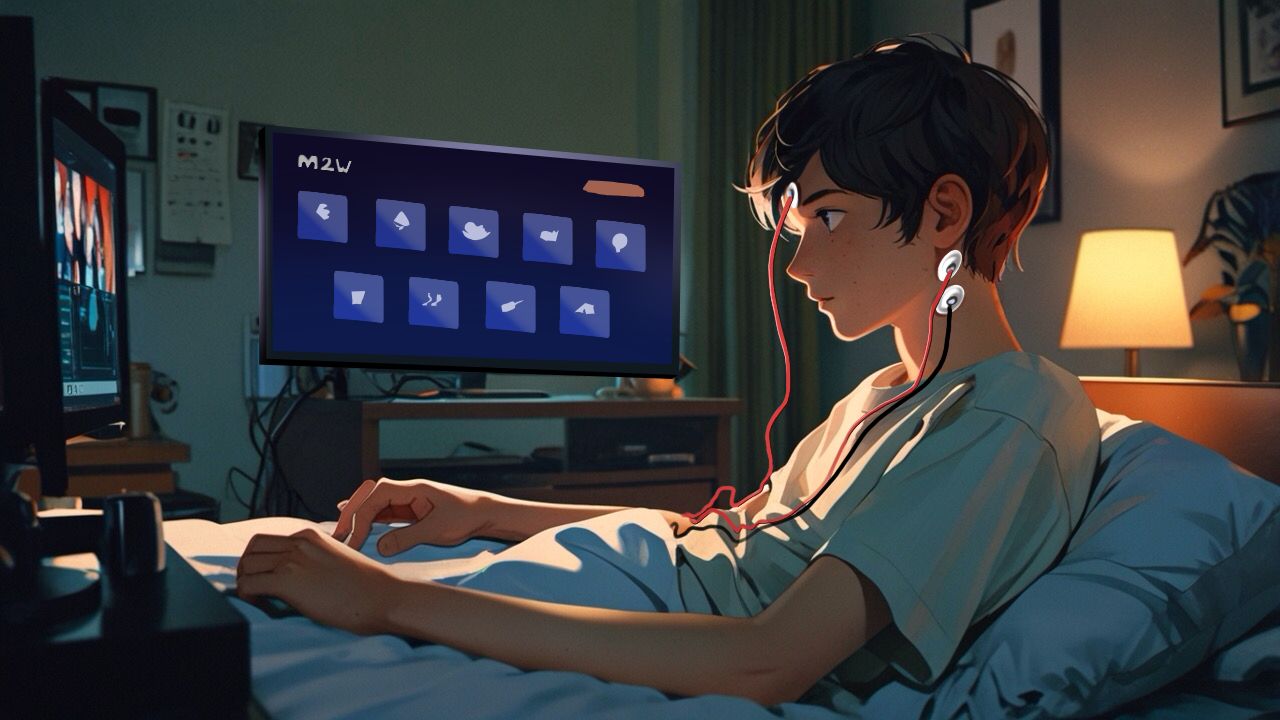
In this project, we’ll learn how to control the Mind-to-Words (M2W) application using eye blinks (EOG artifacts) from a single channel EEG data. Everything is done using an NPG Lite device running a novel algorithm that can separate double blink, triple blink, focus, and jaw clench signals from a single channel EEG.
M2W is an open-source project that converts double/triple eye-blinks into intuitive commands to navigate items (double blink) in a menu and select them (triple blink) — letting you hover and select words on-screen (web interface on browser), hands-free.
Video Demonstration:
Here is an ALS patient using M2W:
Overview
This system uses Electrooculography (EOG) signals to recognize specific eye-blink patterns and translate them into M2W menu actions:
- Double blink: Hover through menu options
- Triple blink: Select and speak the highlighted option
All powered by NPG Lite, a compact, wireless bio-potential amplifier with WiFi/BLE/Thread/Zigbee wireless protocols.
How It Works
The M2W app receives real-time blink commands from NPG Lite via Bluetooth:
| Signal Type | Blink Pattern | Menu Response |
|---|---|---|
| EOG | Double Blink | Hover (move to next) |
| EOG | Triple Blink | Speak & Select option |
| Idle / Single Blink | None | No action |
What You’ll Need
Hardware Components
- NPG Lite kit (Neuro Playground Lite)
- 3x Snap cables + electrodes (or alligator clips)
- Skin prep gel (e.g., Nuprep)
- Alcohol wipes
- USB-C cable
- Laptop (for setup and connectivity, runs M2W app in browser)
Software Requirements
Skin Preparation
For best signal quality:
- Apply Nuprep gel, gently scrub to remove dead skin/oil. (Optional but recommended)
- Clean electrode sites with alcohol wipes.
These steps help ensure strong and stable bio-potential signal acquisition.
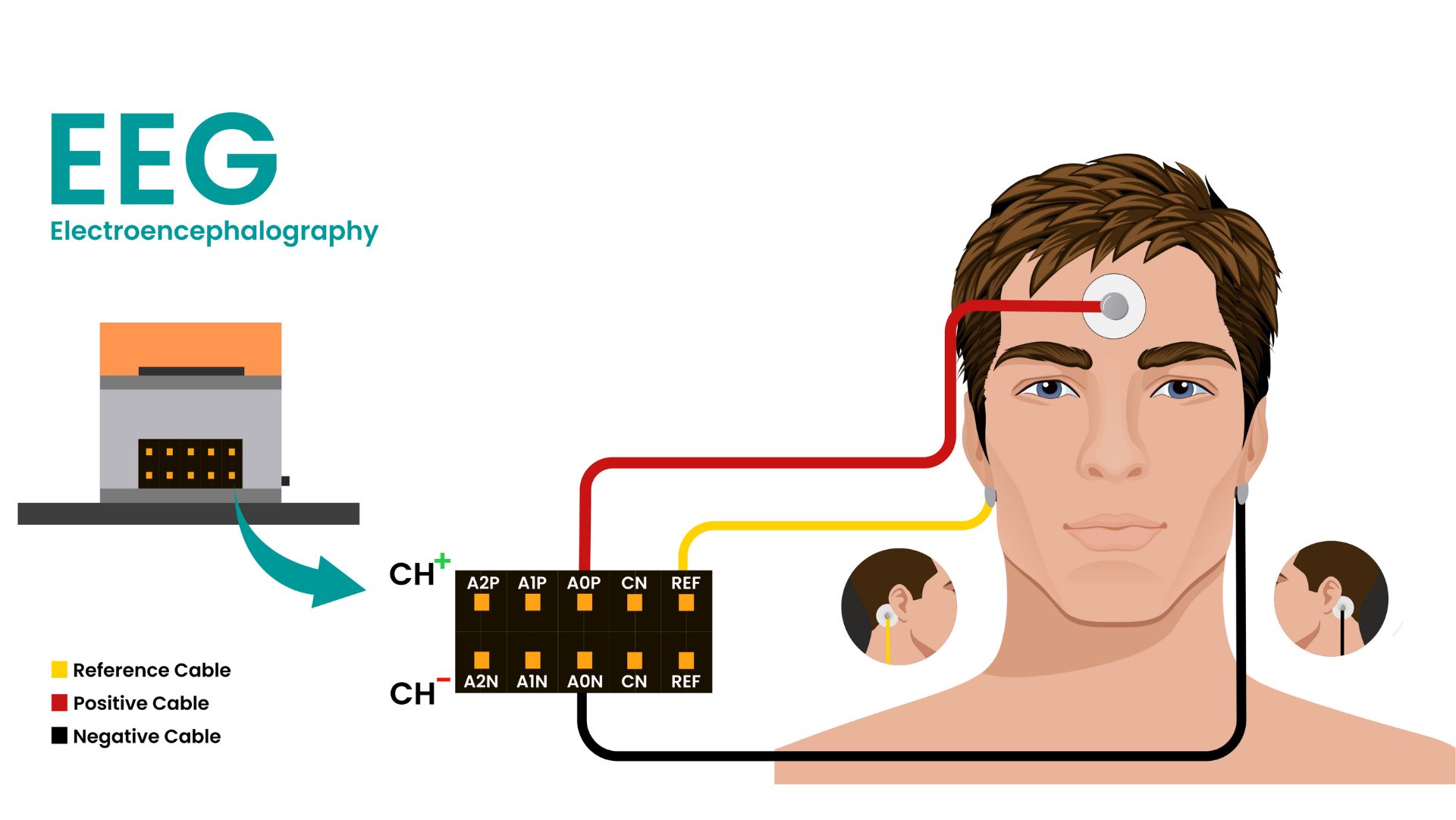
Electrode Placement Guide
Correct electrode placement is critical for reliable blink detection:
| Signal | Channel | Placement Location |
|---|---|---|
| Positive | A0P | Forehead (center) |
| Negative | A0N | Behind right ear |
| Reference | REF | Behind left ear |
Firmware Setup
Flash NPG Lite
- Download NPG Lite Flasher for your Operating System.
- Open the flasher tool, click Get from GitHub.
- Download and select BCI-Blink-BLE firmware.
- Connect your NPG Lite via USB-C.
- Turn on NPG Lite by toggling the switch on.
- Select the correct port and flash firmware.
Your device is now ready to stream blink signals over BLE.
Video Demonstration:
Here is a guided walkthrough of NPG Lite Flasher:
Connecting to M2W App
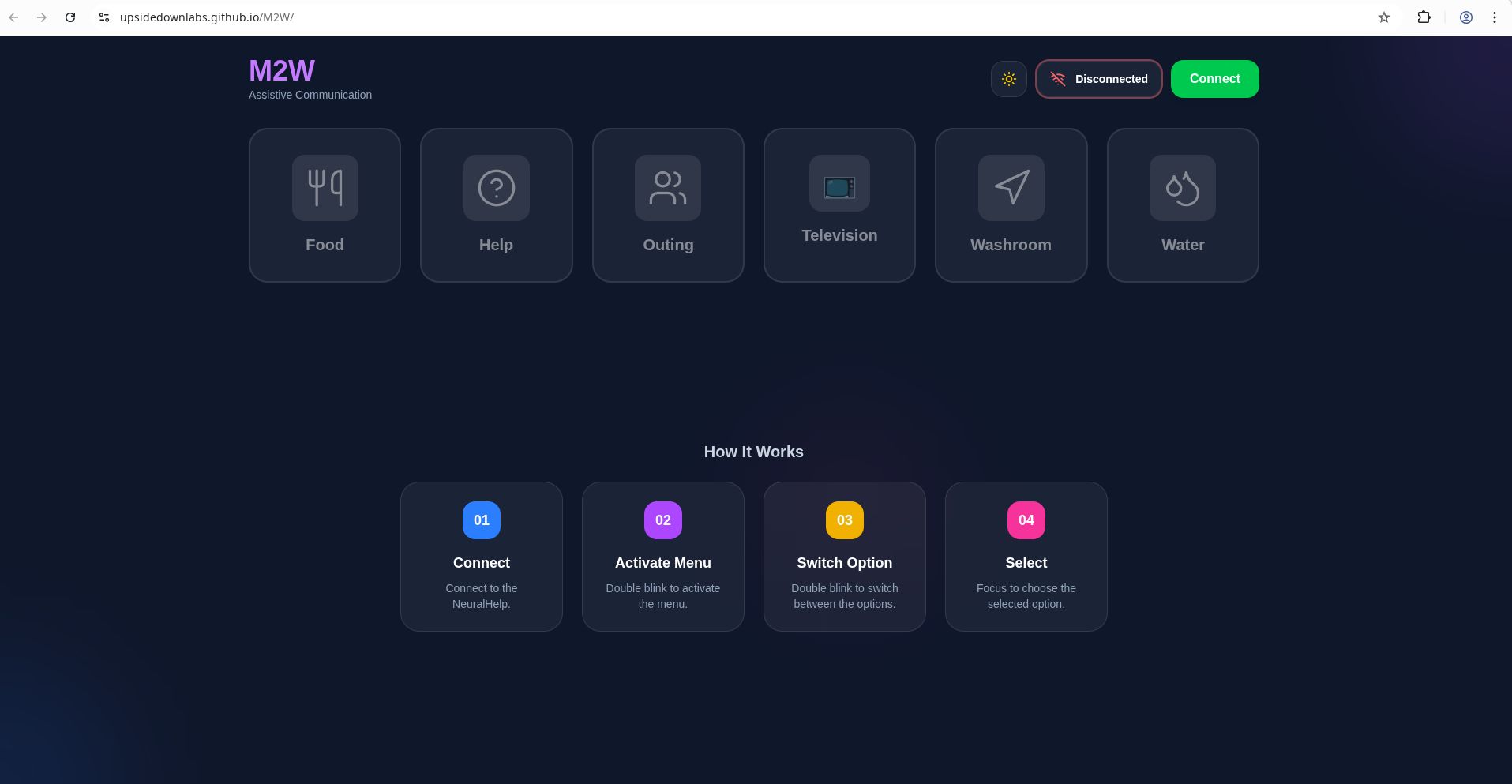
- Open the M2W Web app in chrome/brave: https://upsidedownlabs.github.io/M2W/
- Click Connect to scan for BLE devices.
- In the dialog box, select esp32c6_eeg (your NPG Lite device).
- Once connected, electrode signals are streamed in real-time.
- Try blinking:
- Double blink: Hover menu items
- Triple blink: Speak/select the option
Control Commands
| Blink Action | Response |
|---|---|
| Double Blink | Hover menu item |
| Triple Blink | Speak & Select highlighted |
| Idle / Single Blink | No action |
Performance Tips
- Perform strong, deliberate blinks.
- Sit still during operation for clean signals.
- Ensure good skin contact with electrodes.
- Minimize ambient noise (electrical interference) by sitting 5m away from AC appliances such as flourescent tube lights, microwaves, etc.
Troubleshooting
No Signal / Poor Signal
- Reapply electrodes & conductive gel.
- Clean skin with alcohol wipes.
- Confirm correct electrode placement.
Device Not Connecting
- Ensure BCI-BLINK-BLE firmware is flashed.
- Select the correct Bluetooth device (esp32c6_eeg).
- Stay within 5-10m range of laptop connected to NPG Lite.
Bluetooth Issues
- Bluetooth should be enabled on the system
- Ensure BLE firmware is flashed correctly
- Check device is powered on (LED indicators)
- Clear browser cache and reload
- Move the device closer to the system (within 10 meters)
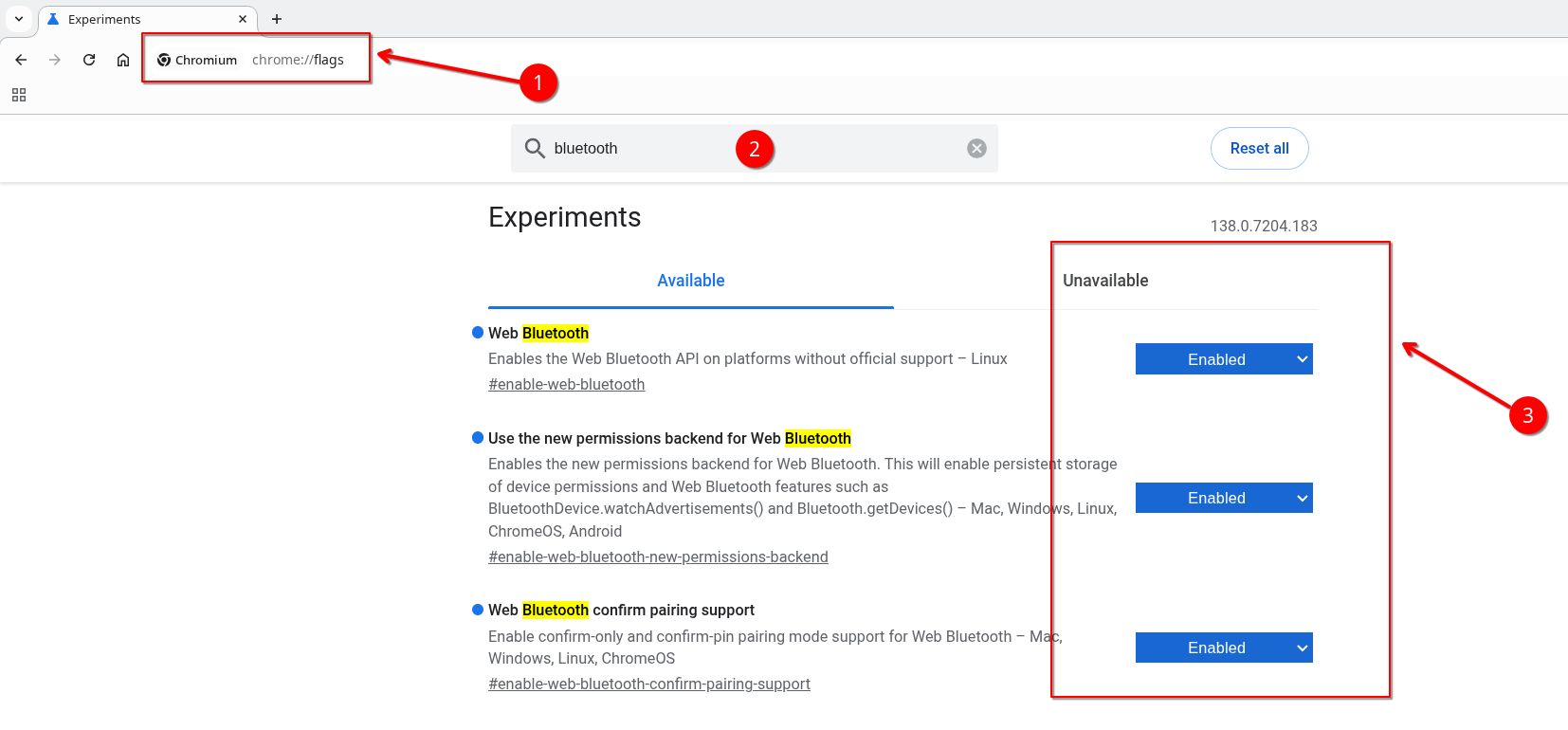
If you still face issues connecting to your device via bluetooth, follow these steps and try again:
- Go to you chromium based browser
- Type chrome://flags in the search bar and hit enter
- Search for Bluetooth and enable everything related to Web Bluetooth
- Restart your browser
- Try connecting again
False Triggers
- Reduce background movement/muscle artifacts.
- Adjust blink strength (train consistent blinks).
Technical Details
Signal Processing
- EOG: Detects blink amplitude and duration
- Double/triple blink Recognition: Timing-based event detection
- Communication: BLE: M2W Web App (real-time)
System Specs
- NPG Lite:
- Three-channel BioAmp
- BLE wireless interface
- USB-C charge & debug
- M2W app: Web-based, runs in Chromium-based browser like Chrome/Brave.
Applications & Use Cases
- Assistive Communication (for people with limited speech/mobility)
- Hands-free Interfaces (for accessibility computing)
- hci/bci Education (learning signal processing for HCI/BCI)
- Human-Computer Interaction (novel blink-based control)
Future Enhancements
- Add custom blink patterns for more menu actions
- Integrate with text-to-speech engine for free-form communication
- Machine learning-based blink classifier
- Support for multiple users and calibration profiles
Learn More
Resources
Community
Support
Need help?
- Contact
- File issues on GitHub
- Contribute improvements via PRs