Last Thursday, we joined Helen Leigh for a Teardown Session where we shared how Glider and Caster work, introduced our Glider Mega Adapter for reusing e-ink panels, highlighted some demos, and talked about what’s next on the roadmap. If you haven’t seen it yet, check it out!
In last week’s update, we set a goal of reaching 90%. We are now 98% funded thanks to 147 backers! Every pledge, share, and suggestion helps shape this project and push it forward. So, if you haven’t already, please Back the campaign on Crowd Supply and help us reach our funding goal this week!
Developer Kit SDK
Hi everyone, my name is Michael and I’ve been helping on the software end of Modos. It’s been incredible to see the energy from the community during this crowdfunding campaign!
We are SO CLOSE to our goal. It’s inspiring to see the excitement surrounding the idea we’ve been working on for so many years.
Today I want to share some of the work we’ve been doing to simplify development using the Modos Paper Monitor. Built into the driver board is a USB host that allows you to perform many operations, beyond simply pushing pixels. To simplify access to these extra features, we’re building an SDK that can be used in Python, Rust, and C.
Along with options for refreshing the entire screen and portions of the screen, the first version of the SDK will also allow you to set different update modes for different areas of the screen.
For instance, if you’re using a code editor, you can set the code pane to the “typing” mode to get the fastest, cleanest experience for editing code, while leaving the rest of the screen in the “browsing” mode to get high-quality grays for UI and navigation.
We’ve made the API as simple as possible to get started. For instance, here’s the code in Python for setting up this demo (you’ll have to set up the different applications):
from glider_api import *

d = Display()

# Set the lefthand side of the screen to 1-bit black and white. This is mode
# is currently only accessible via the API. In the demo video, this mode is used
# for drawing & using the terminal.
d.set_mode(Mode.FastMonoNoDither, Rect(0, 0, 800, 1200))

# Set the right-top corner of the screen to the "Reading" mode, which uses a
# 1-bit mode when the content is updating and then updates regions of gray once
# the content stops changing. In the demo video, this mode is used for maps.
d.set_mode(Mode.AutoNoDither, Rect(800, 0, 1600, 600))

# Set the right-bottom corner of the screen to the "Browsing" mode, which is
# 1-bit but uses dither to approximate gray values. In the demo video, this mode
# is used for SuperTuxCart.
d.set_mode(Mode.FastMonoBayer, Rect(800, 600, 1600, 1200))
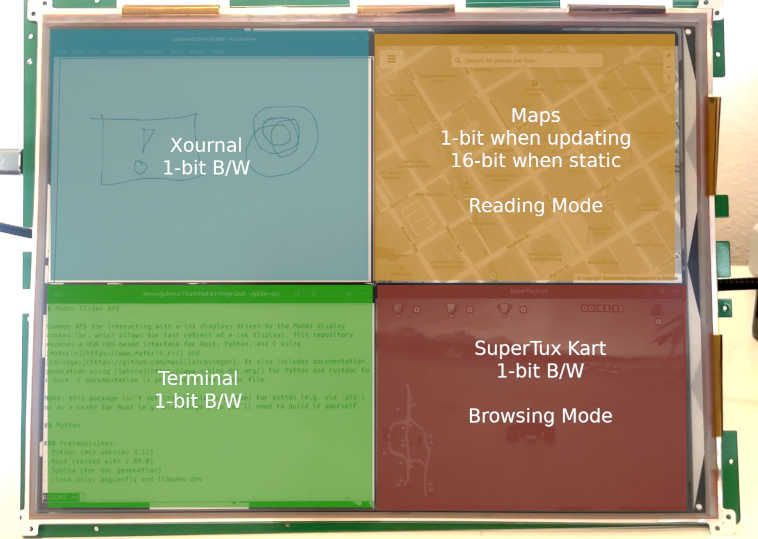
The SDK is now available on GitHub for those who are interested in learning more. We also have several other features in the works:
- APIs for updating the firmware
- APIs for changing the waveform (the specific settings for driving various e-ink displays)
- APIs for configuring settings for the display, like refresh rate and resolution
We’ve also received many questions about how we might be able to take this even further, possibly integrating directly into the OS desktop compositor to provide hints as to which window should receive which update setting. We’ve done some research into this, and there are many possibilities.
Alex gave a great talk at the Linux App Summit covering some of the progress.
Thanks to hrdl and the PineNote team, we’ve been able to explore some ideas for making this a reality. You can also dig into the details in the PINE64 blog, particularly their April update and their August update, or by checking out hrdl’s PineNote repository.
We can’t wait to see what you create with this!